S U H A S O F T

Loading

img

Document Management System

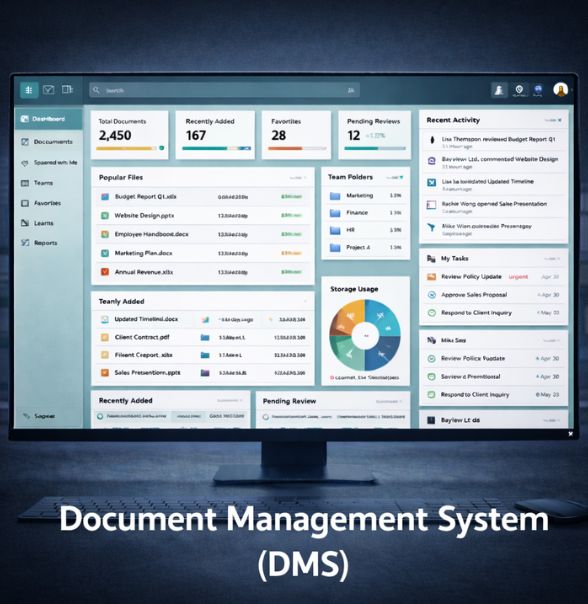
A Document Management System is like a digital library with superpowers. Instead of shelves, it uses metadata. Instead of dusty files, it keeps documents neat, searchable, and always up to date. It helps organizations tame information chaos and keep work flowing smoothly.

Objectives
  • Centralize All Documents: Bring files from scattered folders, inboxes, and shared drives into one organized home.
  • Improve Document Accessibility: Allow teams to find the right document quickly through powerful search, indexing, and categorization.
  • Maintain Document Integrity: Control versions so there’s always one source of truth instead of a dozen slightly different copies.
  • Strengthen Security: Protect sensitive documents through permissions, encryption, access logs, and audit controls.
  • Enhance Collaboration: Enable teams to review, comment, co-edit, and share documents without losing track of changes.
  • Support Compliance and Governance: Ensure document retention, access rules, and audit data follow organizational and regulatory standards.
Key Modules
  • Document Capture & Import: Upload tools, drag-and-drop interfaces, email ingestion, scanner integration, and optical character recognition for converting paper into searchable digital text.
  • Document Indexing & Metadata Management: Tagging, classification rules, and metadata templates so documents know where they belong.
  • Storage & Repository: A secure digital vault structured with folders, taxonomies, access rules, and retention policies.
  • Search & Retrieval Engine: Full-text search, filters, facets, and saved queries for quick information discovery.
  • Version Control: Stores every revision, tracks who changed what, and lets users roll back if something goes sideways.
  • Access Control & Permissions: Role-based access, multi-level permissions, and optional multifactor authentication.
  • Collaboration Tools: Commenting, annotations, co-authoring, and internal/external sharing links.
  • Workflow Automation: Routing, approval steps, reminders, and process automation tied to document actions.
  • Audit Trail & Compliance: Logs of views, edits, approvals, downloads, and deletions for governance and audits.
  • Integration APIs: Connections to email clients, ERP/CRM systems, HR systems, cloud storage, and digital signature platforms
Workflow
  • Capture or Upload:
    • ★ A user uploads a document or the system captures it from email, scanner, or integration.
  • Indexing & Classification:
    • ★ Metadata is added manually or automatically, guiding where the document will live.
  • Storage in Repository:
    • ★ The system saves the document in the proper folder or category, applying access permissions.
  • Access & Retrieval:
    • ★ Users search or navigate the structure to open or download documents.
  • Collaboration & Editing:
    • ★ Users annotate, comment, edit, or share documents with others, depending on their permission level.
  • Versioning & Updates:
    • ★ Each edit creates a new version. Old versions remain available for reference.
  • Security & Audit Tracking:
    • ★ Every interaction is logged for compliance and transparency.
  • Retention & Archiving:
    • ★ Documents are retained, archived, or deleted according to policy.
Key Features
  • Centralized repository for all document types
  • Powerful search engine with metadata, tags, and full-text search
  • Granular permissions with role-based access
  • Version history with easy rollback
  • Check-in/check-out to prevent editing conflicts
  • Annotations and comments for smooth collaboration
  • Automated workflows for document routing or approvals
  • OCR support for scanned documents
  • Document sharing with secure external links
  • Compliance management with audit logs and retention rules
  • Backup and recovery options
  • Mobile access for on-the-go retrieval and updates
Benefits
  • Better Organization: Documents are no longer scattered across drives, inboxes, and personal laptops.
  • Faster Information Retrieval: Search becomes as simple as typing a few words instead of opening a maze of folders.
  • Improved Accuracy: Version control ensures teams work on the current document, not last week’s draft.
  • Stronger Security: Permissions, encryption, and audit trails protect sensitive information.
  • Enhanced Collaboration: Teams can comment, co-edit, and share without losing track of changes.
  • Lower Operational Costs: Less printing, less physical storage, fewer manual handoffs.
  • Compliance Confidence: Retention policies and audit logs help reduce risks during audits or regulatory checks.
  • Business Continuity: Backups and recovery tools guard against data loss.